INDUSTRY:
EDUCATION
TIMFRAME:
6 WEEKS (PART-TIME)
ROLE:
UI/UX DESIGNER
TOOL:
FIGMA

Building a collaborative resource hub for teachers
context.
TeachBox: Making teaching resources easy to find, easy to share
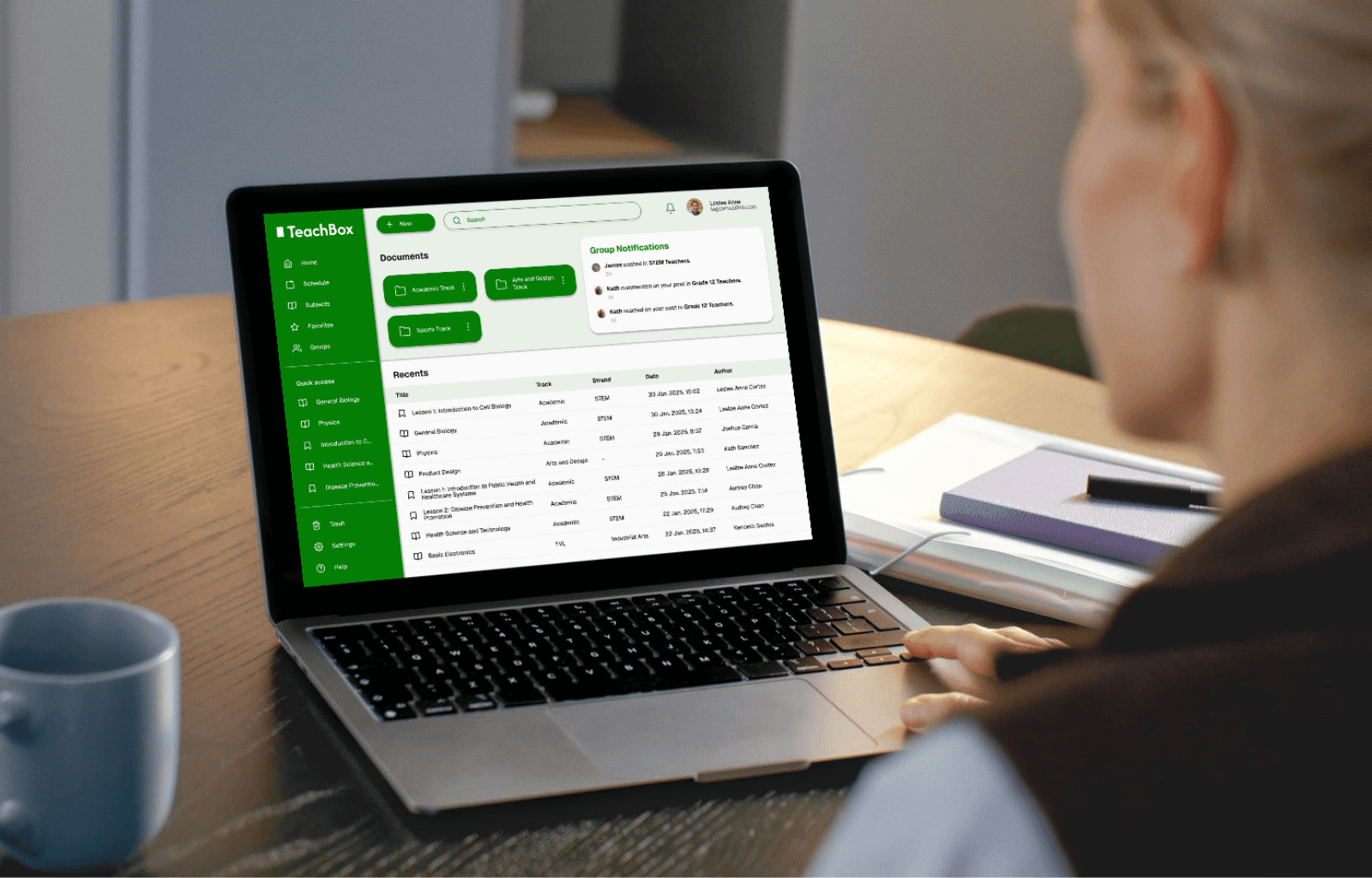
Teachers spend countless hours searching for files, juggling different formats, and struggling to collaborate. TeachBox changes that. It’s a clean, centralized platform that makes organizing, accessing, and sharing teaching materials intuitive, even for less tech-savvy users. With collaborative features built in, it doesn’t just store resources—it builds connection and consistency across teams.
This project began with an intentional question I asked my sister, who is also a teacher: “What do you think teachers in your school need today?” I wanted to understand not just her day-to-day experience, but also gain insight into what educators—and perhaps the broader education sector—might be lacking. Her response, “We need a repository for all our teaching materials,” sparked the idea behind TeachBox: a solution grounded in real, everyday classroom challenges.
For this project, I led the end-to-end UI/UX process, including user research, wireframing and prototyping in Figma, user testing, and implementing feedback to ensure the platform was intuitive, accessible, and aligned with real classroom needs.
problem.
TeachBox seeks to address these core challenges:
Fragmented resource storage: Teachers spend unnecessary time tracking down lesson materials scattered across multiple platforms, drives, and devices, reducing their time for planning and teaching.
Version confusion: With no reliable way to identify the most current or official version of a file, educators often duplicate work or use outdated materials, impacting lesson quality and consistency.
Technology overwhelm: Many teachers, especially those less tech-savvy, find existing tools too complex or unintuitive, creating barriers to effective resource management and adoption.
Lack of quality oversight: Administrators face challenges in monitoring and maintaining consistent standards across teaching resources, making it harder to ensure content quality school-wide.
Limited collaboration: Without a shared, centralized system, teachers miss opportunities to co-create, share, and build on each other’s work, resulting in duplicated efforts and siloed knowledge.
Problem statements
Teachers need a simple, organized, and collaborative space to store, retrieve, and share teaching materials because time spent managing scattered files reduces their focus on lesson planning and limits opportunities to co-create better classroom resources.
Non-tech-savvy educators need an intuitive and stress-free platform to manage class materials because overwhelming interfaces prevent her from using digital tools effectively.
School administrators need a centralized, scalable system to oversee and manage teaching content because consistent quality, streamlined workflows, and long-term digital infrastructure are essential to maintaining high educational standards and supporting future-ready schools.
research.
Based on the problems identified, I created HMW questions:
How might we…
create a centralized platform that supports both individual organization and team collaboration among educators?
make it easier for teachers to co-create and build upon shared classroom resources?
design an intuitive platform that simplifies file management for teachers with limited tech experience
enable administrators to monitor and manage teaching materials efficiently across departments?
align resource management with long-term goals for digital transformation in schools?
Research methods
To better understand educator needs, I began my research by conducting informal interviews and an online survey with high school teachers. These conversations helped surface pain points around resource storage, collaboration, and tech usability from both teacher and administrator perspectives.
In parallel, I reviewed commonly used resource management platforms like Google Drive and OneDrive to identify familiar patterns, usability pitfalls, and opportunities for simplification. This competitive analysis helped ensure the final design would feel intuitive while addressing gaps specific to school environments.
Below are screenshots of responses from high school teachers who participated in the online survey that I adminsitered.
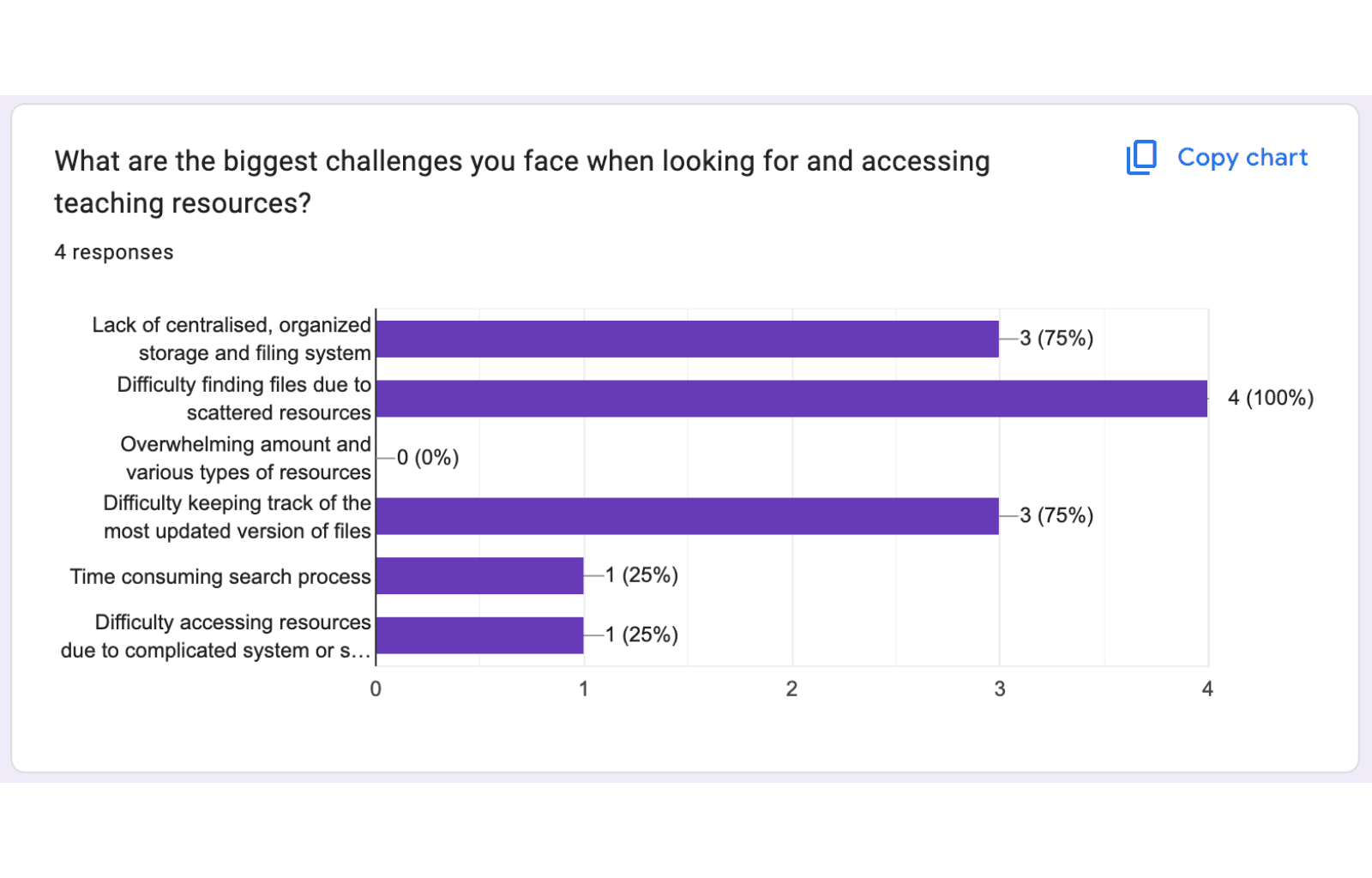
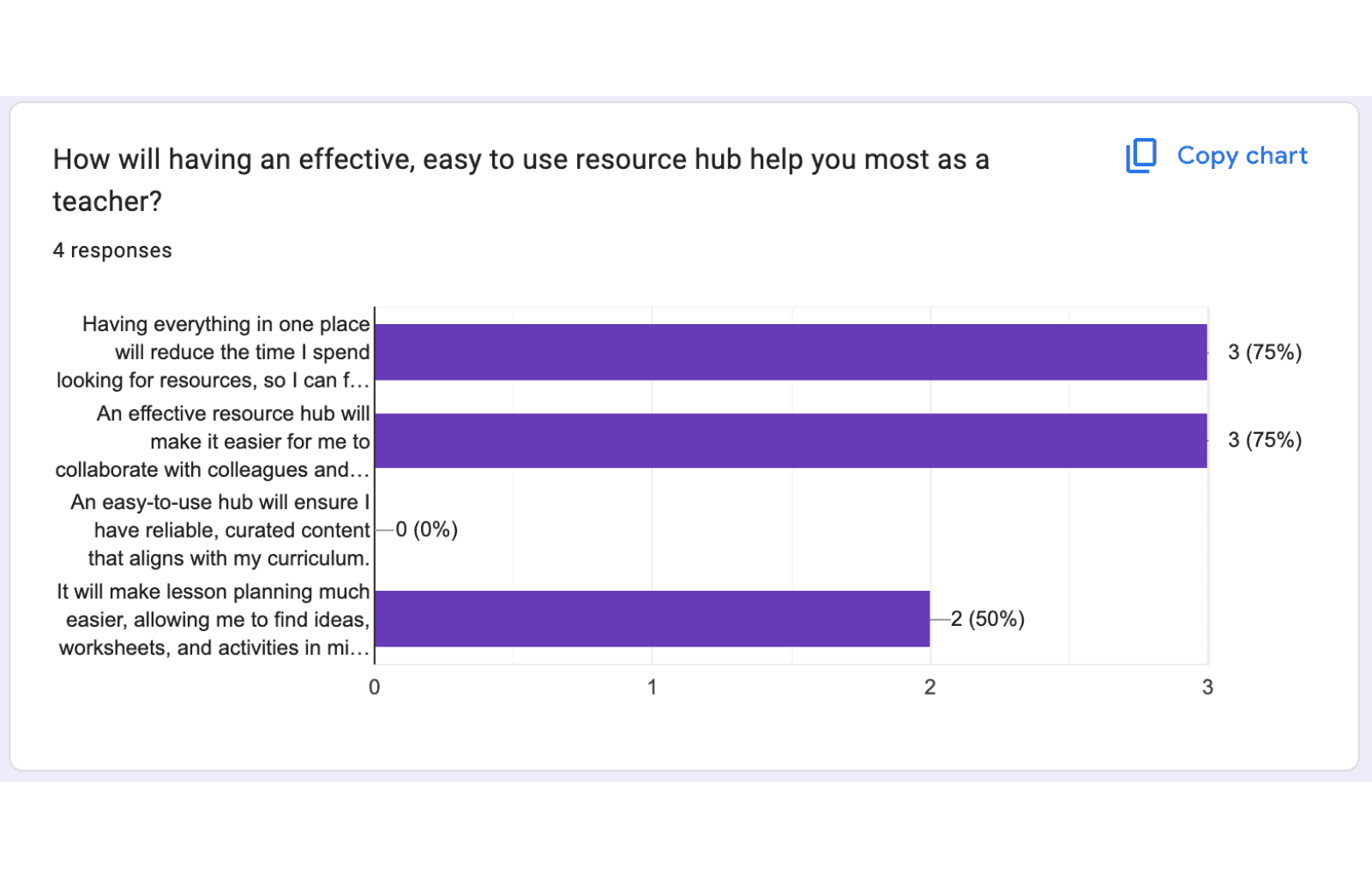
Based on their responses, I created user personas and stories, which include the user goals and frustrations.
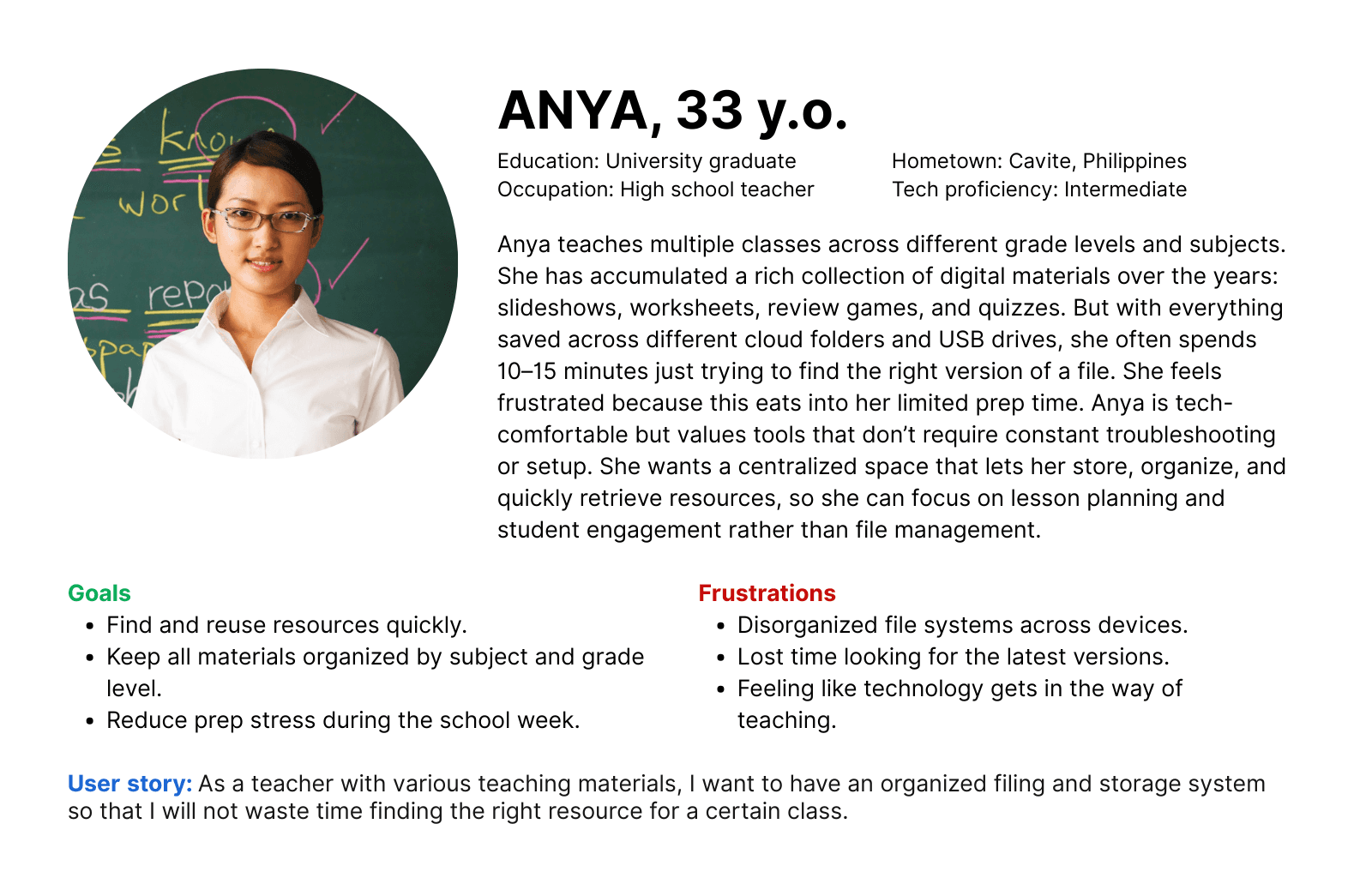
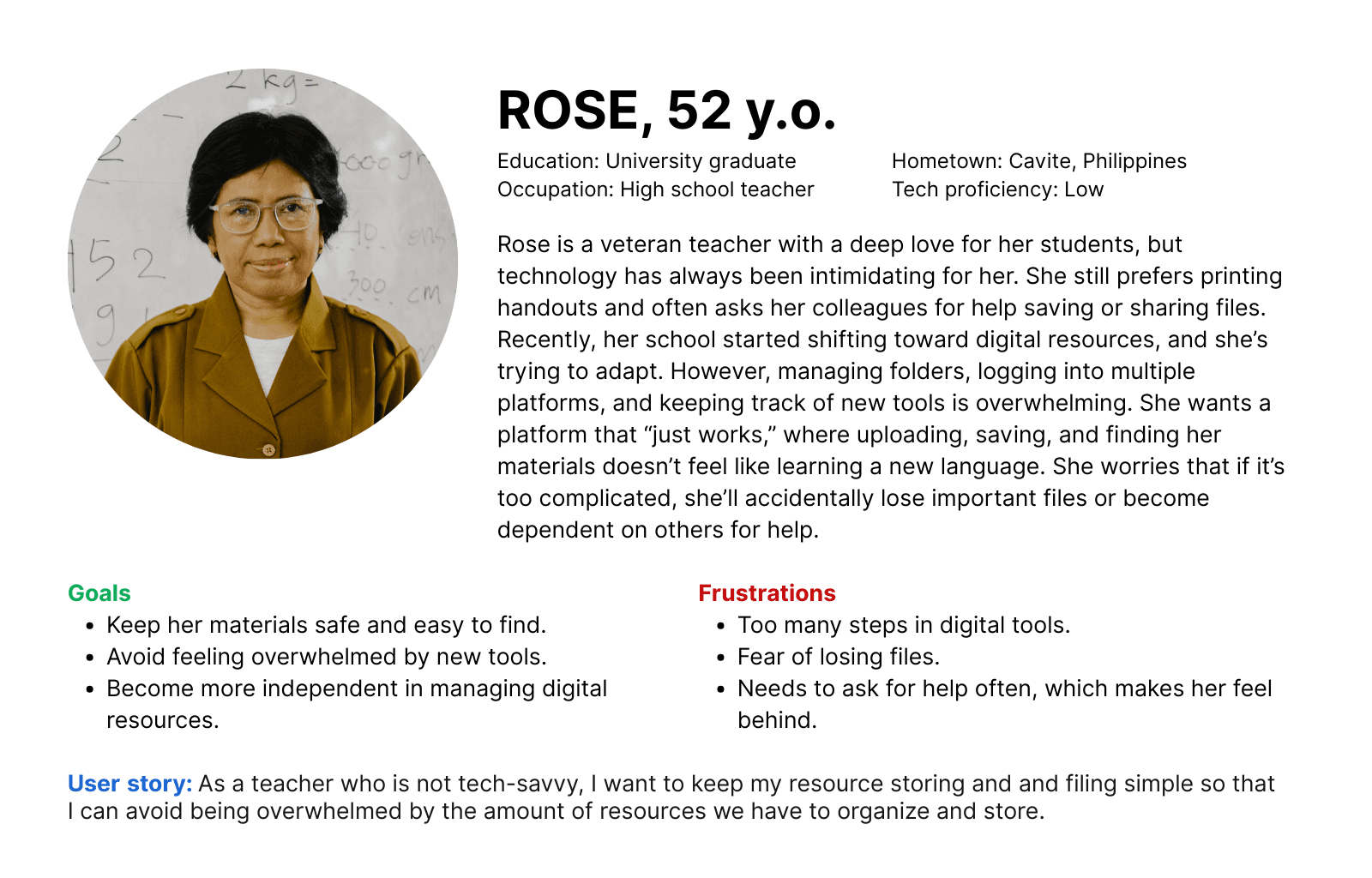
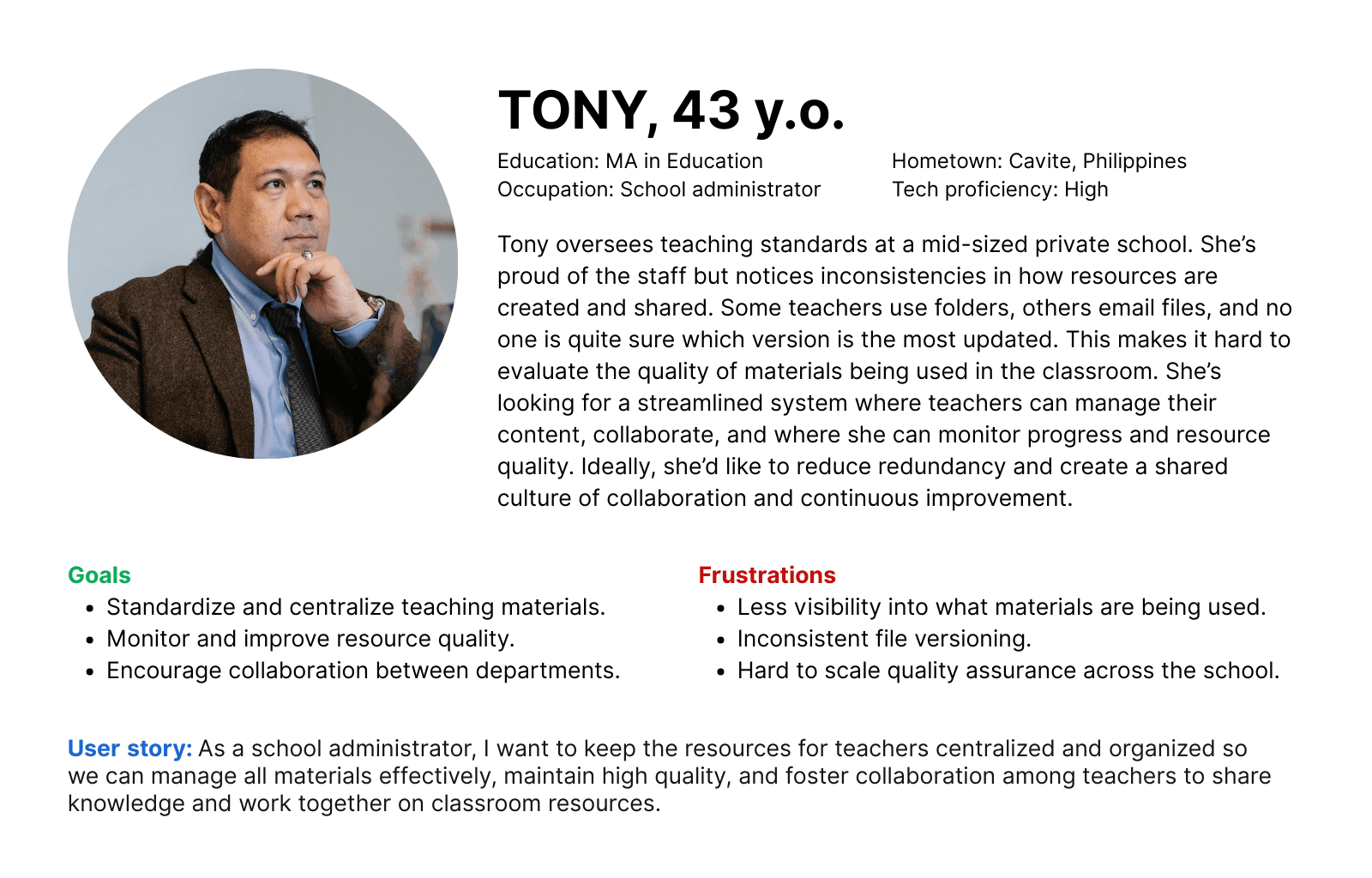
Key user research insights
Based on the user research, the following insights were gathered:
Clear categorization and filters save time: Consistent file organization and intuitive search functions emerged as top priorities. These features help teachers locate resources quickly, especially during time-sensitive prep.
Cognitive simplicity is critical: Teachers prefer tools that reduce mental load. They’re already balancing lesson planning, grading, and admin work, so any added complexity becomes a barrier to use.
Complex tools hinder adoption: Many teachers, especially those less tech-savvy, avoid digital tools that feel overwhelming or cluttered. A minimal, user-friendly interface is key to adoption.
Collaboration drives value: Teachers want more than just personal storage—they’re looking for a shared space to exchange ideas, co-develop resources, and learn from one another’s strategies.
Impact on design
The final design prioritized clarity and minimalism, using a calming color palette, clean file architecture, and intuitive filters to guide user actions. Since the main user base was desktop-first, the initial prototype focused on desktop functionality, with mobile responsiveness scoped for future development.
design.
Each major insight from the user research directly influenced by design decisions:
Visual simplicity → Use a minimal interface with ample white space and a calming color palette to reduce visual clutter and make the platform feel approachable, especially for overwhelmed or non-tech-savvy users.
Ease of navigation → Apply clear visual hierarchy, filters and readable typography to support quick scanning and task-switching, helping busy teachers stay focused and efficient.
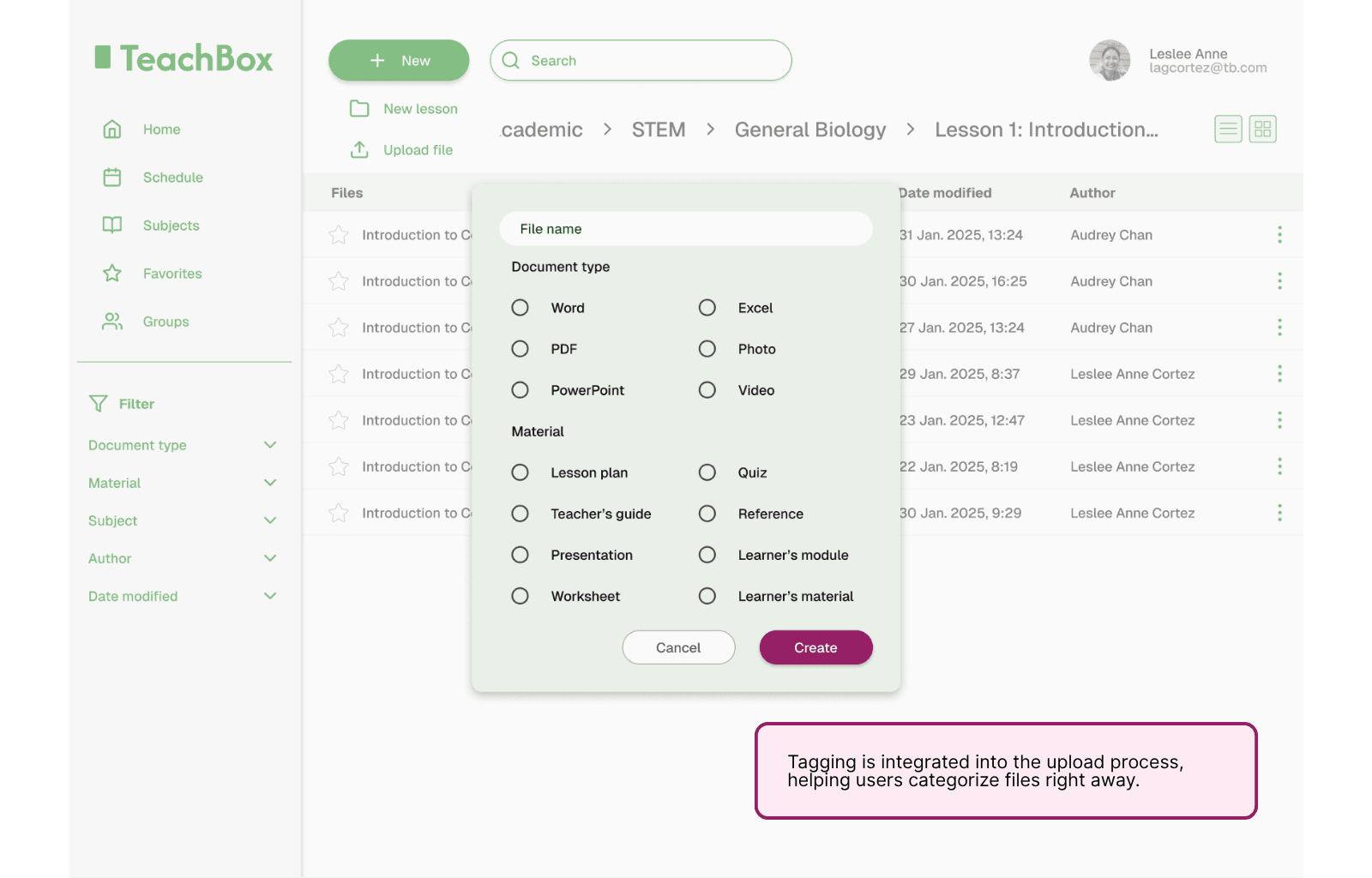
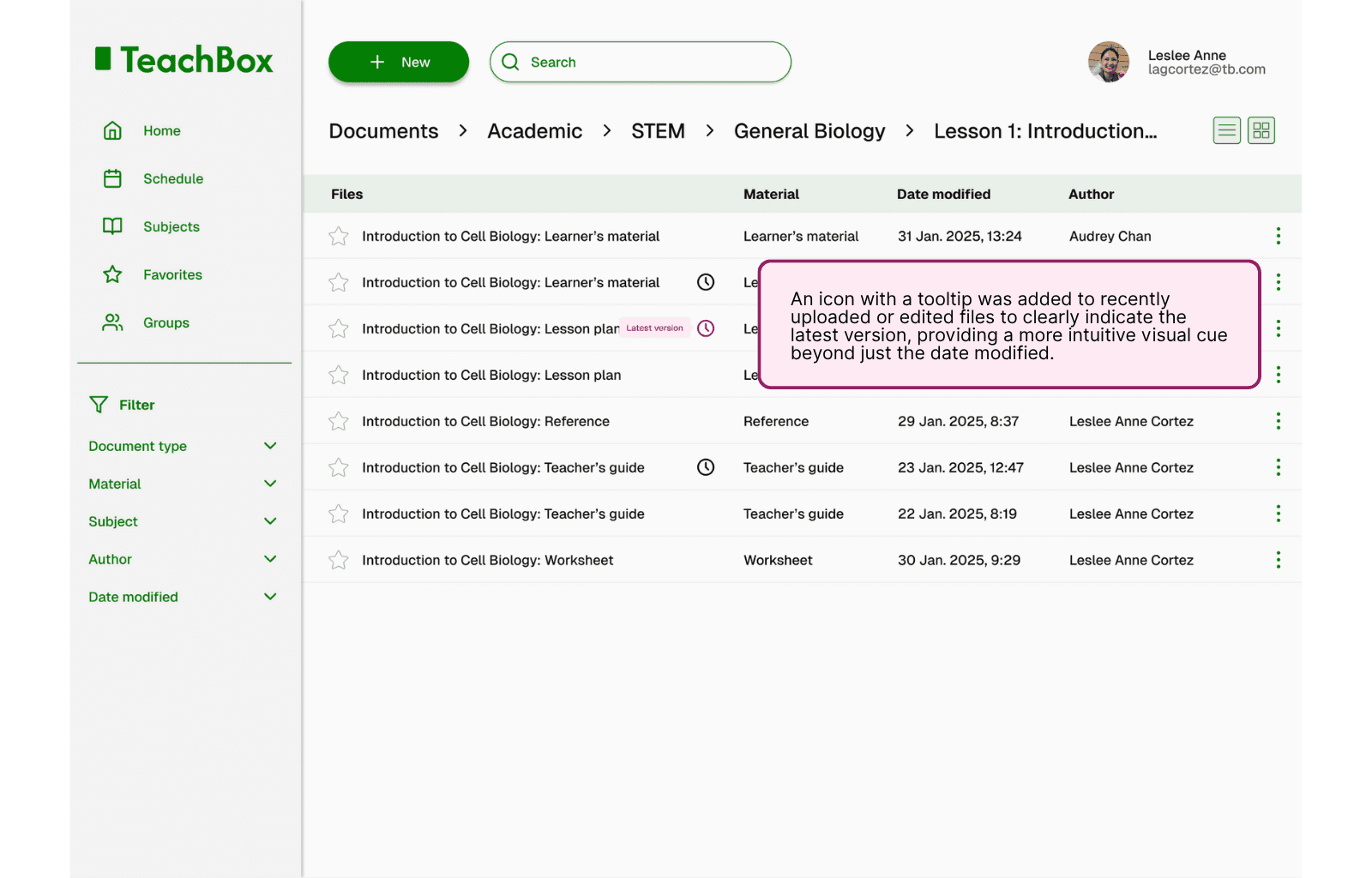
Version control and categorization → Add version indicators and tagging features so users could confidently track updates and filter resources by subject, type, or author, minimizing confusion and duplication.
Collaboration support → Design a shared resource space that encourages contribution and discovery, fostering a culture of co-creation and knowledge exchange among educators.
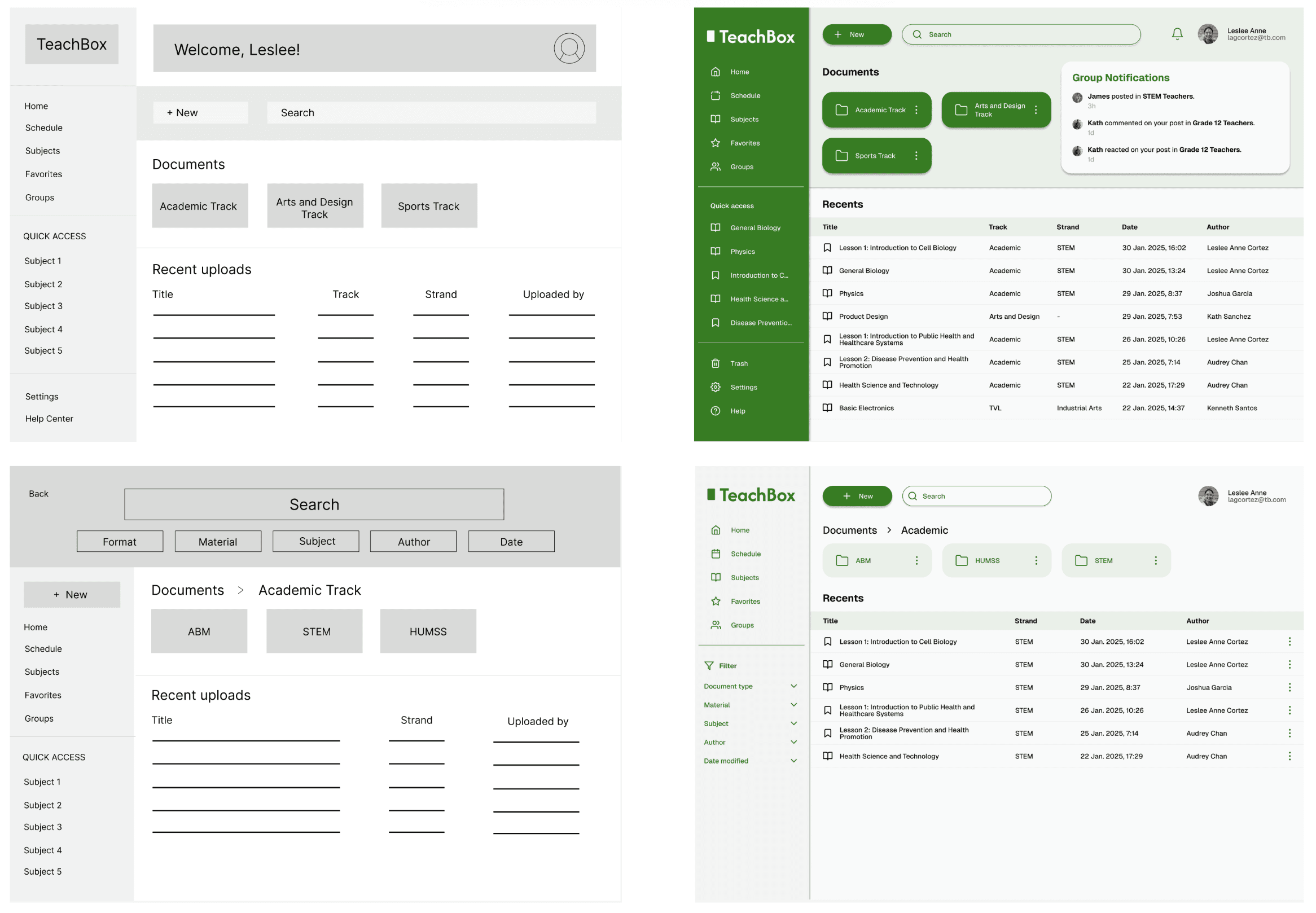
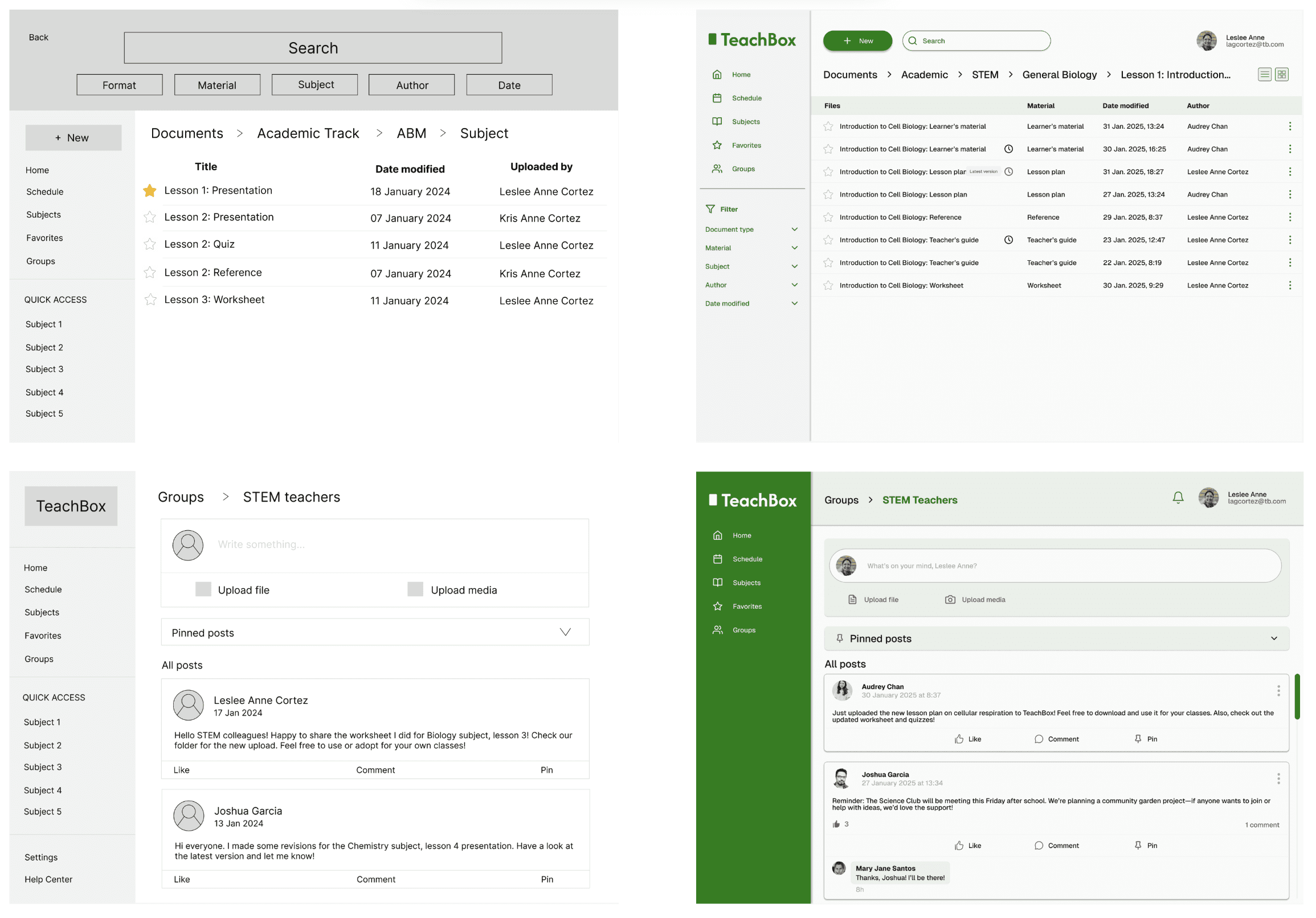
I began ideating by creating paper sketches of possible interface. These were later turned into lo-fi and hi-fi wireframes and prototypes.
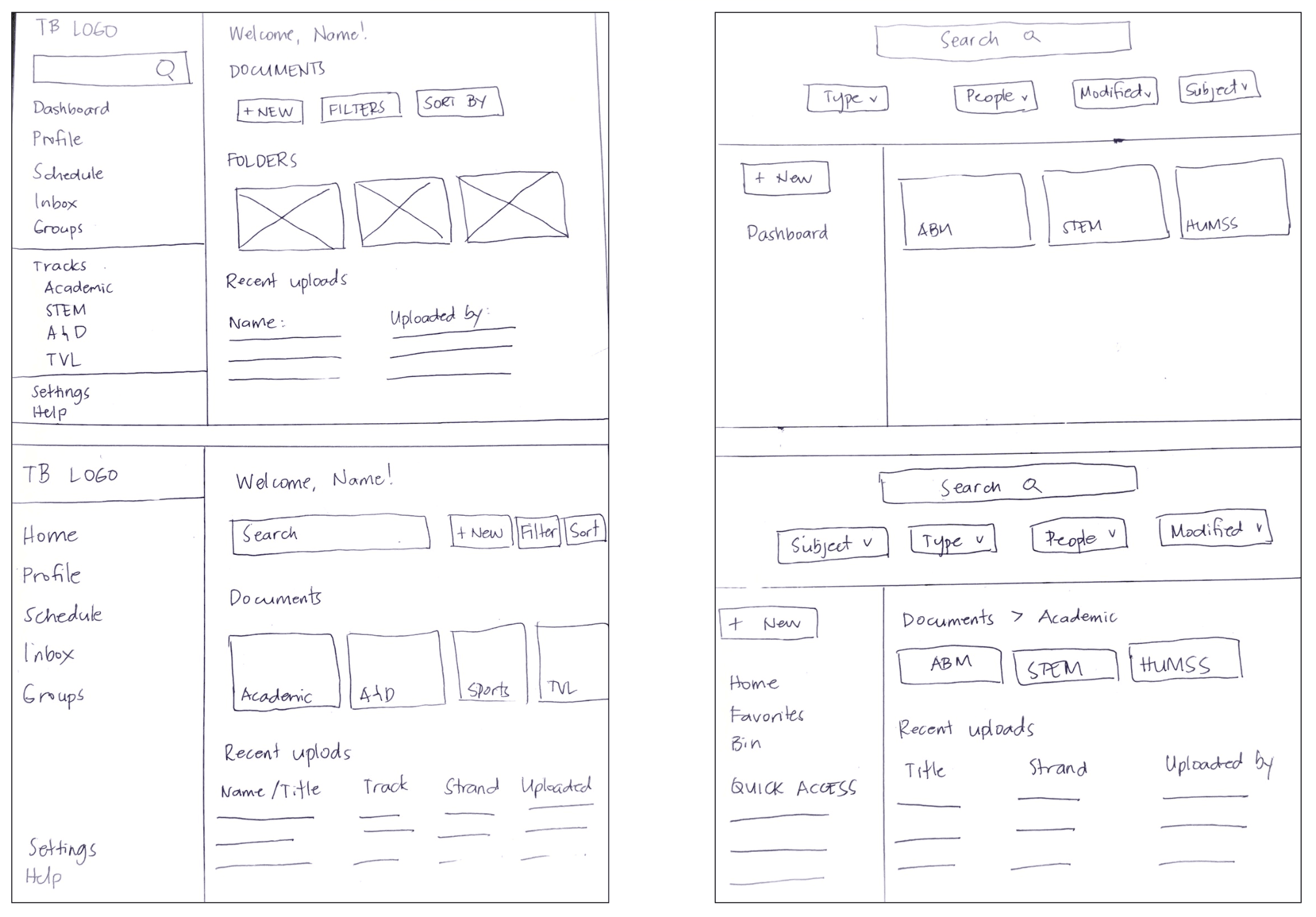
Initial lo-fi wireframes turned into hi-fi mockups after iterations
User testing
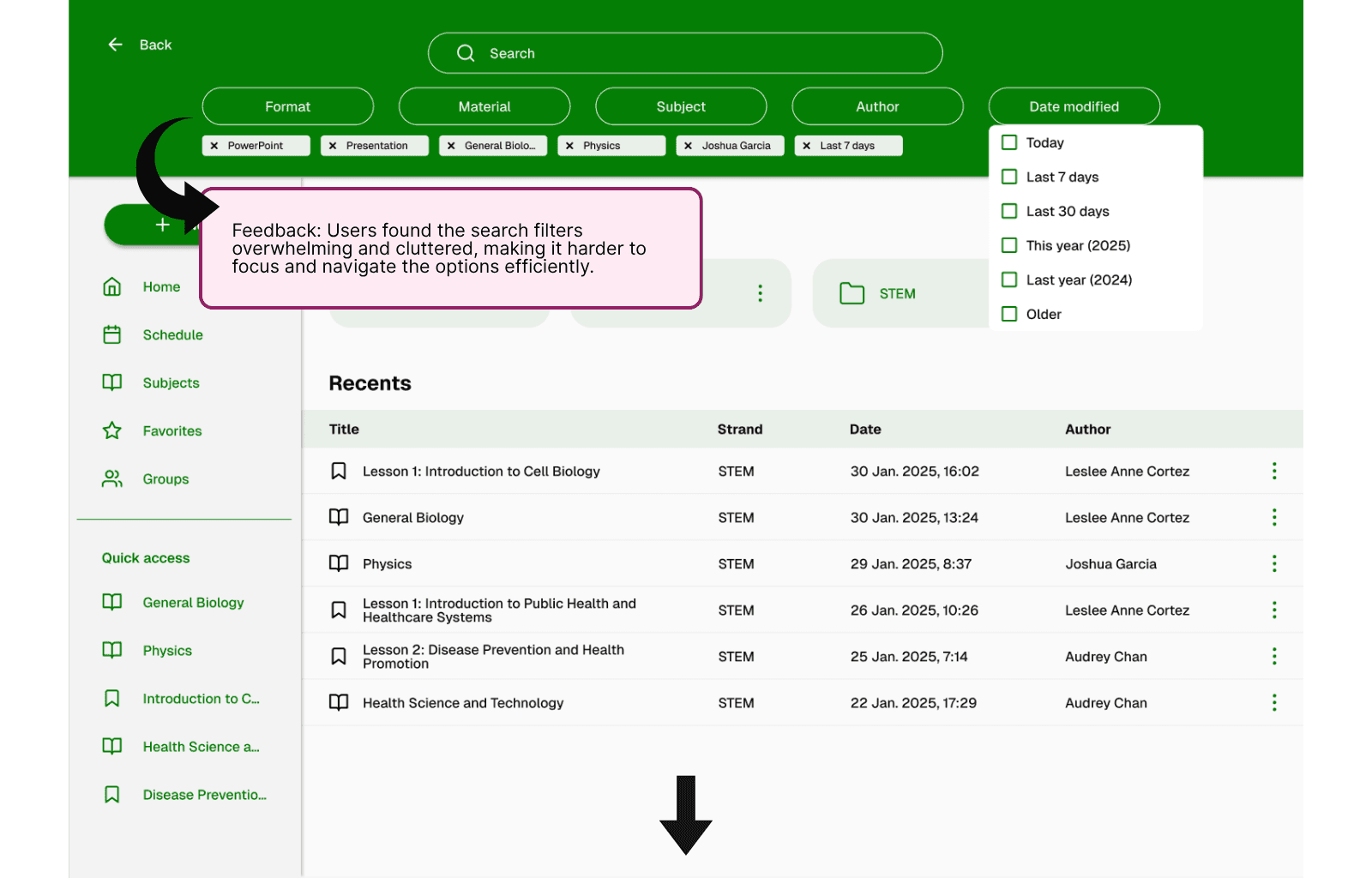
Two rounds of unmoderated usability testing were conducted with teachers and some administrators. Feedback was largely positive, with participants describing the interface as intuitive and well-organized. However, some suggestions were made to clarify filter design and labels, and other features such as indicators of latest version or tags.
Key user testing insights
Based on the user testing, the following insights were gathered:
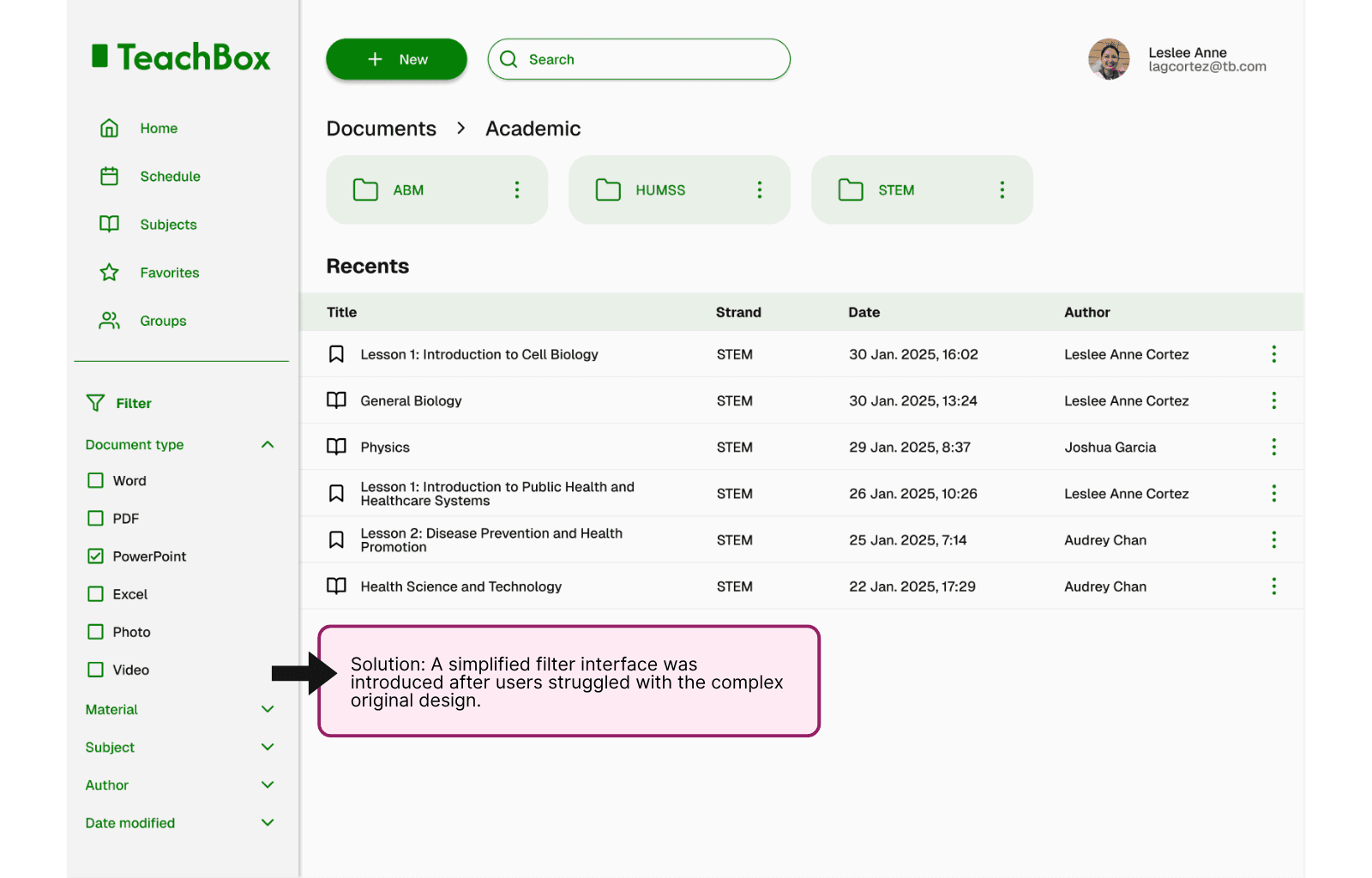
Simplifying filter design and labels reduces cognitive load, making it easier for teachers to quickly find what they need without confusion.
Visual indicators for recent uploads or edits build trust that teachers are using the most updated materials, avoiding version mix-ups.
Adding tags during upload keeps resources organized without requiring extra steps later, streamlining the teacher's workflow.
Iterations
Based on these insights, the following iterations were made:
Adjusted filters to match educator language
Redesigned filters for faster access and less cluttered look
Improved tagging suggestions based on file type
Iterations made based on user feedback
results.
Teachers reported being able to easily use the platform for searching, creating new folders and files, uploading, and organizing their materials. The Groups feature was also valued, as it enabled smoother collaboration among teachers and supported resource sharing across classes and departments.
Impact on users
TeachBox is expected to help educators regain valuable time and mental bandwidth by streamlining how they manage teaching resources. The simplified design allows even the least tech-savvy users to navigate the system with confidence, reducing the stress often tied to digital tools. Collaboration among staff is also anticipated to improve, as sharing and tracking files becomes more seamless and intuitive.
For administrators, TeachBox offers centralized oversight of materials, making it easier to ensure content quality and consistency across classes. It also supports scalable digital infrastructure, enabling schools to build more efficient, future-ready systems for content management and internal coordination.
Impact on product vision
The success of the TeachBox prototype signals strong potential for centralized, educator-focused resource management systems. Its launch is expected to pave the way for future enhancements such as collaborative folders, AI-assisted tagging, multilingual support, and deeper integration with existing school CMS tools, further aligning the platform with evolving educator needs.
Lessons Learned
One of the most powerful lessons was how important it is to design for emotional as well as functional needs. Teachers aren’t just looking for tools, they’re looking for support. Simplicity in tech isn't just a convenience; for many educators, it's a prerequisite for adoption. We also learned that empathy-driven design—using familiar language, minimizing steps, and offering clear visual cues—helps users feel respected and understood. This project reinforced the idea that successful design starts with listening and continues through thoughtful iteration.
Areas for Future Improvement
Build a responsive mobile version for flexible access
Integrate with school-wide CMS tools for seamless content management
Explore AI-assisted tagging to reduce manual categorization efforts